
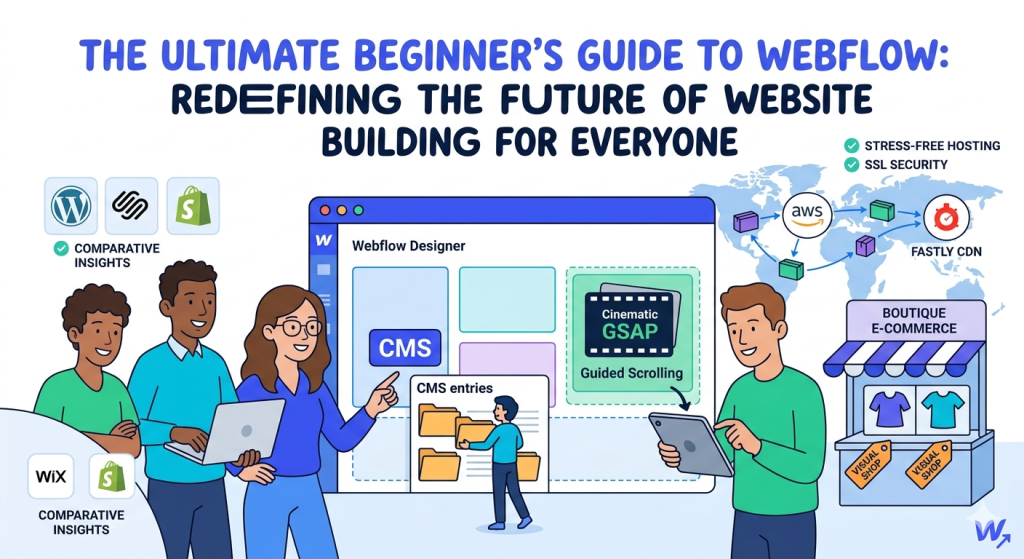
The Ultimate Webflow Review: How It Redefines the Future of Website Building for Everyone
Welcome to Your Ultimate No-Code Odyssey!
If you’ve ever felt completely overwhelmed by the choices in website building—trapped between simple drag-and-drop tools that box you into rigid design structures, or heavy programming setups that require endless technical study—this friendly blueprint is written just for you. Webflow bridges this historical divide. It provides a visual arena where your creative imagination instantly translates into lightning-fast, production-ready code behind the scenes. Let’s break down everything you need to know about Webflow’s features, capabilities, and exciting future prospects!
Comprehensive Handbook Roadmap
1. Demystifying Webflow: Visual Design Meets True Web Logic
When most people think of building websites without coding, their minds naturally wander toward classic drag-and-drop web tools. We’ve all seen them: platforms that give you a generic, pre-made template where you can loosely toss images, text blocks, and decorative icons wherever you like. While this approach seems friendly at first glance, it often leads to deep frustration down the road. Why? Because it ignores the clean, orderly structure that web browsers actually need to run smoothly.
Webflow takes a much smarter approach. Instead of completely hiding web design principles from you, Webflow turns those principles into an intuitive, visual playground. Think of it as a **visual translator**. On screen, you draw, customize, and arrange elements visually, while Webflow’s engine instantly converts those design choices into semantic, clean front-end code.
This structural clarity ensures your website avoids the heavy code bloat common with generic builders. Because your choices map perfectly to standard web development guidelines, your site runs with exceptional stability across all modern screens and browsers. This clean foundation makes your platform incredibly reliable, keeping your digital home robust and accessible for years to come.
The Beginner’s Concept Bridge: Understanding Web Layouts
Think of simple builders like a digital poster board where things are pinned loosely in place. It works great on your own monitor, but it easily falls apart on smaller smartphones or widescreen displays. Webflow treats layouts like a smart nested stacking puzzle (the web box model). Everything is contained in organized, adaptive zones. This ensures your layouts scale fluidly and beautifully across all modern screens.
2. The Design Editor: The Beginner’s Creative Canvas
Stepping into Webflow’s main design panel for the first time feels incredibly exciting. Instead of navigating an uninspiring content form, you enter a professional creative studio that looks like modern design applications such as Figma, Sketch, or Adobe Photoshop. Every styling tool, spacing slider, and layout controller is laid out intuitively at your fingertips.
This visual setup means you never have to settle for cookie-cutter, templated layouts. If you want to build a bold asymmetrical section, overlap text across a vibrant lifestyle image, or keep navigation bars pinned smoothly to the top of the viewport, you can do it with simple mouse controls. You have absolute freedom over layout positioning, padding values, color palettes, and typographic scales.
Webflow makes this visual design journey even more approachable by integrating intelligent AI assistants natively into the core layout panel. If you ever feel stuck staring at an empty layout section, you can simply write a natural language request like, “Build an elegant three-column feature showcase with soft cards and clean iconography.” Webflow’s AI instantly drafts a fully editable visual framework matching web standards, letting beginners skip tedious structural setups and jump straight into refining their creative style.
3. Simplified Account Economics: Finding Your Perfect Plan
Webflow has completely redesigned its self-serve subscription paths, moving away from confusing old tier models and replacing them with highly simplified options. This updated structure makes it incredibly easy to choose a plan that perfectly aligns with your project goals and operational budget.
Let’s map out exactly what each plan option includes, ensuring you find the best starting point for your unique digital journey:
Starter Sandbox
Build up to two pages using web layouts to practice your design skills and get comfortable with the ecosystem entirely for free.
Basic Plan
Perfect for landing pages, simple portfolios, and personal brochures. Connect your custom domain and expand layouts up to 300 pages.
Premium Plan
The ultimate tier for active content creators. Unlocks the advanced CMS engine with room for up to 20,000 dynamic entries across 40 collections.
This plan alignment gives you massive scalability room. Beginners can hone their creative workflows in the free Starter Sandbox without any artificial time pressure. Once you are ready to connect a personalized brand domain name, launching is entirely seamless. For teams looking to share information regularly, the Premium Plan provides exceptional value, unlocking huge database ceilings that previously required expensive enterprise contracts.
4. Next-Gen CMS: Seamless Data Management Built for Growth
If you aren’t an experienced systems engineer, acronyms like “CMS” can sound intimidating. However, a Content Management System is simply a smart visual filing cabinet for your website’s data. It stores content—like blog posts, project galleries, local team directories, or resource listings—separately from the main visual layout styling.
Imagine you run a fast-growing travel review site. Without an organized CMS engine, adding a new destination profile would require manually duplicating an existing webpage, copying and pasting data sections line by line, and carefully re-linking navigation hooks across the site. This repetitive process is slow, tedious, and highly prone to error.
Webflow’s advanced CMS transforms this entire workflow into a seamless experience. You define your content architecture once—such as establishing fields for a location name, descriptive copy block, cover asset, and rating scale. After designing the visual framework for a single template page, Webflow handles the heavy lifting, instantly generating thousands of unique pages as you input new entries into your collections.
This system also features a beautiful, incredibly clear **In-Context Content Editor**. When you or your clients need to update an entry, there is no confusing database back-end to navigate. Instead, you simply log into your site’s custom content view, double-click any copy block directly on the page viewport, and make your adjustments natively. Your site updates instantly across the web while keeping your underlying layout completely safe.
5. Stress-Free Premium Hosting: Speed, Security, & Absolute Peace of Mind
With traditional website building, setting up hosting can often feel like a stressful second project. You usually have to research third-party hosting companies, configure obscure nameserver records, run regular manual backups, and purchase individual security certificates to protect visitor data. For beginners, managing this ongoing maintenance overhead can be a major technical headache.
Webflow eliminates all of this complexity by bundling professional-grade hosting straight into every site account. Your finished design assets are automatically pre-compiled into ultra-light, highly optimized static code configurations distributed across an advanced cloud delivery infrastructure backed by **Amazon Web Services (AWS)** and the **Fastly Content Delivery Network (CDN)**.
This hosting approach means your website loads almost instantly for visitors all over the world, while giving you complete peace of mind:
- Blazing Load Speeds: Since your layout files are saved directly at global network edges, pages load quickly and efficiently without traditional server delays.
- Automated Security Certificates: Webflow generates and maintains premium SSL encryption across your domains automatically, keeping your site safe and trusted by modern browsers.
- Automatic Version Backups: The system takes automated snapshots of your workspace as you design, letting you roll back to a prior layout version with a single click if you ever want to reset your progress.
- Zero Maintenance Overhead: You never have to worry about plugin updates breaking your pages, system software vulnerabilities, or server configurations—Webflow manages everything smoothly in the background.
6. Creative E-Commerce: Crafting Beautiful Boutique Storefronts
For independent creators, local artisan brands, and boutique store operators, your digital shop’s appearance is an extension of your brand identity. It shapes how your products are perceived and valued. Many generic online store solutions use rigid layout structures that can make distinct brands look completely identical, flattening your unique business presentation.
Webflow provides incredible creative freedom for boutique e-commerce. It extends the full power of its visual design panel directly to your product pages, product grids, and checkout workflows. This means you can create a shopping experience that perfectly reflects your brand’s personality.
You can design fluid product galleries, style immersive shopping carts that glide smoothly onto the screen, and create clean, minimal checkout pages that inspire buyer confidence. Whether you are selling digital items, creative assets, or curated physical goods, Webflow makes it simple to handle transactions, track inventory, and send personalized transactional emails within a beautifully branded, cohesive workspace.
7. Visual Motion Magic: Native Animation for Engaging Storytelling
Motion design is an incredibly effective way to capture attention and tell your brand’s story online. When pages feel alive—with subtle text fades, layout elements that glide into position as you scroll, or interactive hover animations—your content instantly feels more premium, professional, and memorable.
Historically, building these complex effects required extensive coding knowledge or the manual setup of complex animation scripts. Webflow makes advanced motion design accessible to everyone by integrating the industry-standard **GreenSock Animation Platform (GSAP)** directly into its visual panel.
This means creating cinematic effects is as simple as using intuitive timeline sliders. You can effortlessly link animations directly to your visitor’s scroll position, creating engaging guided storytelling experiences where graphics reveal themselves naturally as the user reads down the page. Webflow automatically ensures these rich visual interactions run smoothly and efficiently across both desktop setups and mobile devices.
8. Direct Matchups: Webflow vs. WordPress (The Maintenance Battle)
WordPress is an open-source classic that has powered a massive portion of the web for years, celebrated for its vast ecosystem of plugins that expand site features. For teams with dedicated developers, it offers incredible custom flexibility. However, for independent business owners and beginners, managing a WordPress site requires a significant technical time investment.
To keep a WordPress site running safely, you have to choose and pay for independent server hosting, purchase external security certificates, install caching optimization systems, and perform regular, manual updates for dozens of third-party plugins. If a plugin update introduces a technical conflict, your live pages can break instantly, requiring tedious troubleshooting to fix.
Webflow completely removes this ongoing maintenance burden by providing a beautifully managed, secure, all-in-one ecosystem. There are zero plugins to track, update, or patch. Webflow handles security, hosting speed, and core updates seamlessly in the background, freeing your team up to focus completely on creating great content and growing your brand.
9. Direct Matchups: Webflow vs. Squarespace & Wix (Breaking Free)
Platforms like Squarespace and Wix are widely popular for making the website setup process simple and accessible for beginners. They offer clean, pre-built templates that make launching a basic company portfolio or simple personal resume quick and straightforward. For modest, introductory web projects, they can be excellent choices.
However, as your digital presence grows, you can easily hit structural design walls with standard template builders. If you want to customize your layout outside of pre-set grids—such as adjusting a layout property for mobile viewports or creating a unique scroll interaction—templated tools can feel incredibly limiting.
Webflow breaks down these design walls entirely by starting you with a completely open canvas. This gives you absolute freedom to customize every element, font size, and spacing value to match your exact vision. Instead of forcing you to adapt your brand to a generic pre-made template, Webflow scales seamlessly to match your creative ambition.
10. Direct Matchups: Webflow vs. Shopify & Framer (System Scales)
Shopify is an absolute powerhouse for high-volume retail logistics, designed to manage huge inventories, physical store points, international warehouse routing, and complex tax compliance effortlessly. However, because Shopify focuses intensely on transactional funnels, its core theme templates can sometimes feel restrictive for creative marketing teams who want to build unique, immersive brand stories.
Webflow offers an ideal creative balance. It allows you to build rich, highly cinematic product experiences that capture your brand’s unique character. For companies that want to leverage Shopify’s unmatched backend power alongside Webflow’s creative freedom, you can easily embed your Shopify store assets directly into a beautifully customized Webflow frontend layout.
When compared to Framer—which treats web design like an open, free-form vector artboard—Webflow’s strict focus on foundational web standards provides an important structural advantage. Framer relies heavily on complex React code generation in the background, while Webflow outputs clean, organized HTML and CSS. This makes managing global design hierarchies, scaling large databases, and expanding custom content hubs incredibly stable and efficient as your brand grows.
11. The Beginner’s Roadmap to Ultimate Platform Success
Ready to begin your web building adventure? Here is a simple, stress-free roadmap to help you master Webflow step by step:
- Start inside Webflow University: Webflow offers a wonderful library of free, incredibly fun, short video tutorials that explain core web design concepts in simple, accessible language.
- Build a Sandbox Playground: Create a free account tier, open up a two-page draft sandbox, and practice nesting elements, playing with font options, and mapping flexbox rows without any time constraints.
- Experiment with Webflow AI prompts: Use the friendly built-in AI assistant to generate page frameworks for you, then inspect how those visual sections are organized to learn the system naturally.
- Launch and Connect Your Domain: Once your design feels polished and complete, pick a basic or premium account license, connect your custom domain name with a single click, and share your creation with the world!
Your Digital Future is Ready to Begin
Break free from generic design boxes and rigid templates. Claim your permanent free starter sandbox tier today to draw layouts, map custom CMS database collections, and shape your own digital home with absolute creative freedom.